Patch Note ver. 1.1.219.1 (November 18th)
November 18 , 2026Greetings, FS City
The following are the updates for the end of this month.
[System]
1. FreeStyle System Renewal
Upgrade and arrange! Your Freestyles are back, stronger than ever!
The Freestyle system has been renewed.
Please refer to the details below.
1) FreeStyle Management System Change
Freestyles are now acquired by purchasing individual Lv.1 Freestyles. Lv.1 Freestyles can be purchased for 32,000 Coins.
- With this change, the sale and use of FreeStyle Packs, Freestyle Tickets, and Freestyle Pieces will end.
⦁ You can still use owned FreeStyle Packs but FS pieces obtained from them cannot be used.
⦁ FreeStyle-related items you already own (Pieces and Tickets) can be sold for a set amounts of Coins.
- You can upgrade FreeStyle using Coins or Poinrts.
- Upgrades succeed or fail based on probability. On success, the Freestyle is upgraded to the next level. Success rates vary depending on the currency used; see the table below for details.
-When FreeStyle is upgrade, FreeStyle’s stats and equip limit are enhanced.
-If an upgrade fails, FreeStyle keeps its current level and will not lose levels or disappear.
2) FreeStyle Activation System Change
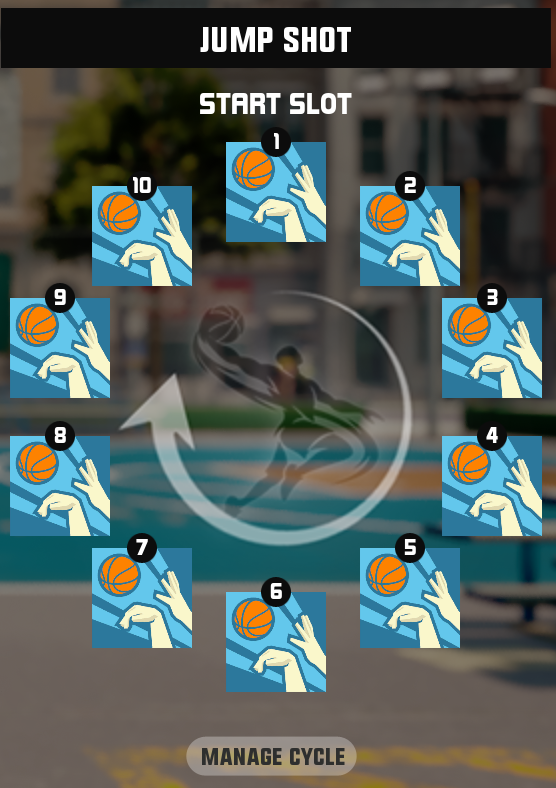
- You can set the activation order of FreeStyle motions for each type: Layup / Dunk / Jump Shot.
- Each FreeStyle motion type has 10 slots, and you can arrange your FreeStyles in any order you like. Each slot can hold only one FreeStyle. If there is no available FreeStyle to equip, the default motion is used.
- To equip the same FreeStyle in another slot, you need to upgrade its level to increase its Equip Limit.
- The next FreeStyle to be activated is shown at the bottom right of the screen during a match.
- Once all FreeStyles in your set order have been activated, the order does not repeat, and only default motions are used afterward.
- Using a Shot Fake does not advance the FreeStyle order; the order stays the same until the current FreeStyle motion is completed.
3) FreeStyle Balance Change
The stats provided by each FreeStyle have been adjusted according to its level. For details on the adjusted stats, please refer to the separate details page.
4) Notes on Existing FreeStyles
- FreeStyles you already own will be transferred to the new system at their current level.
- Players who owned FreeStyles at Lv.2 or higher will receive Upgrade Tickets, which can be used in place of Points for upgrades, as compensation for the FreeStyle system renewal. Motion Enhancement Tickets are granted per FreeStyle; if you own multiple FreeStyles, the number of tickets is calculated based on each FreeStyle's level and granted in total. Please see below for the number of tickets granted.
- Motion Enhancement Tickets will be sent to your Inventory.
2. Point Pass Renewal
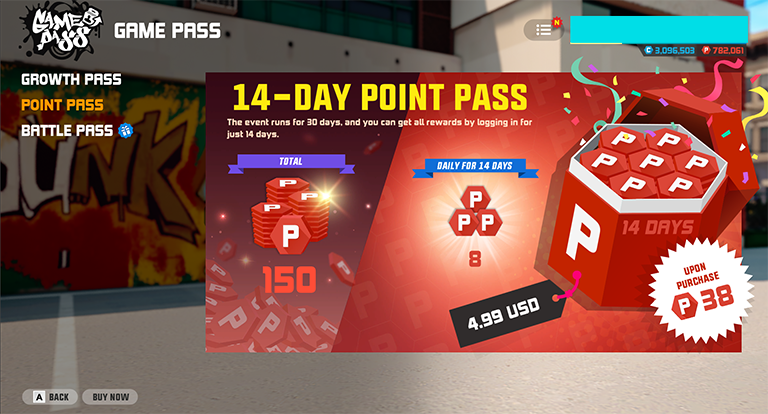
The 30-Day Point Pass has been renewed as a simpler, faster 14-Day Point Pass.
Please see the details below.
- When you purchase the 14-Day Point Pass, you will receive a Point Pass Ticket. The ticket can be used from your Inventory. Using the Point Pass Ticket activates the Point Pass event.
- Once the Point Pass is activated, unlike the previous 30-Day Pass, you can receive daily Point rewards in your Mailbox just by logging in.
- The Point Pass lasts for 30 days after activation. Once you redeem all 14 days reward or activation period is over, Point Pass will be deactivated.
- Point Pass can be reactivated with a Pass Ticket after it expires. While the Pass is active, its duration cannot be extended with a ticket.
- Point Pass Tickets can be purchased repeatedly, and you can hold multiple tickets in your Inventory. However, tickets can only be used one at a time, and only while the Pass is inactive.
- Players currently using the 30-Day Point Pass will keep it until it expires. However, please note that unlike the 14-Day Point Pass, rewards must still be claimed manually from the event page.
~ 3on3 Freestyle Team